
Amazon Product Images, Variants & Video Downloader
Download high-resolution product images, all color and style variant images, and product videos from any Amazon product page 📸🎬. With Amazon Product Images, Variants & Video Downloader, you can save all visual assets from Amazon listings in just a few clicks — perfect for sellers, marketers, researchers, dropshippers, and anyone who needs product media.
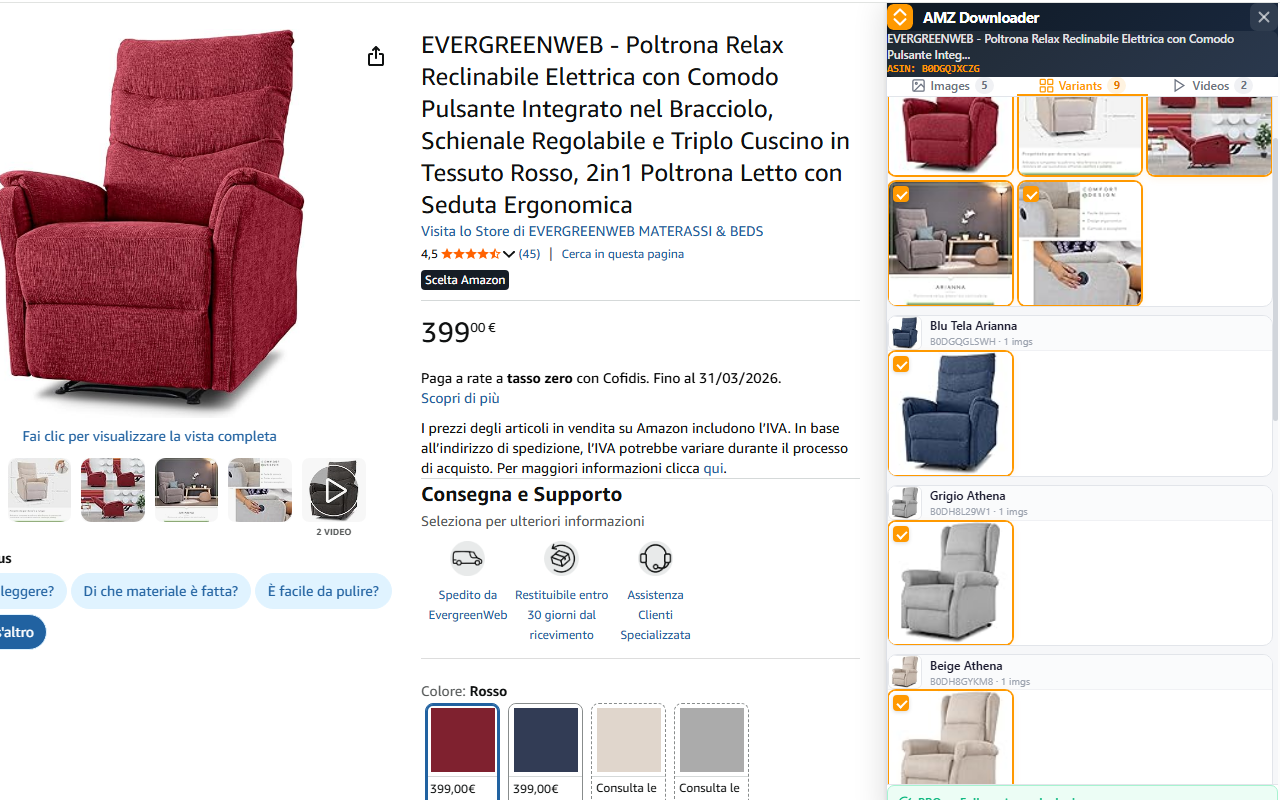
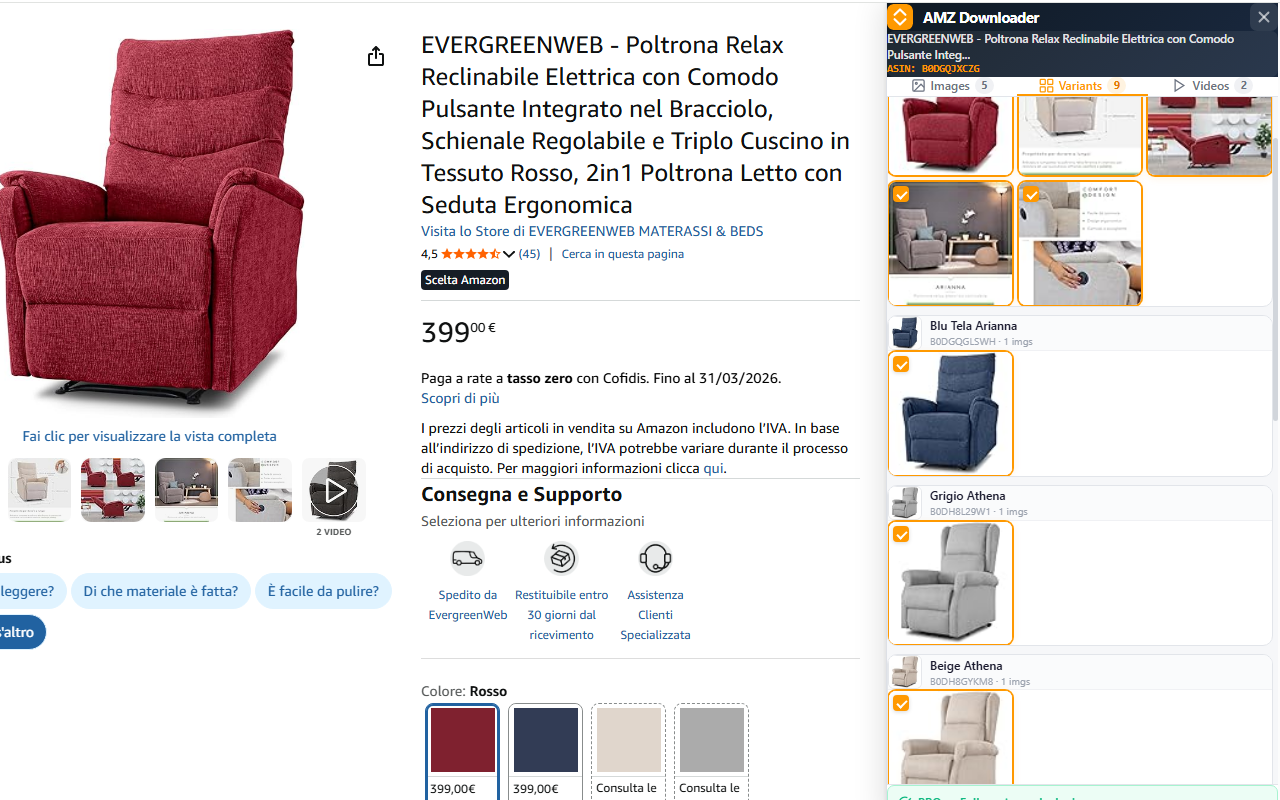
No more right-clicking and saving one image at a time, or struggling with Amazon's protected media. The extension handles everything automatically — extracting high-resolution product photos, collecting all variant images across every color and style option, and discovering all embedded product videos. Everything is organized in a clean, visual gallery interface with tabbed navigation for easy browsing.
One of the standout features is the full variant extraction 🎯. The extension parses Amazon's internal product data structures to find every single image associated with every variant — colors, sizes, styles, and patterns. Images are grouped by variant name and ASIN, making it easy to identify exactly which images belong to which product variation. You get the highest quality available — the same full-resolution images Amazon uses for their zoom feature, not small thumbnails.
Video downloads are handled intelligently. The extension fetches videos using your active Amazon session for proper authentication, validates content types to avoid corrupted files, and saves them as standard MP4 files that play in any media player. Both individual and bulk downloads are supported — download a single video or grab everything at once with progress tracking.
The visual gallery interface features a card-based layout with thumbnail previews, checkbox selection for batch operations, Select All / Deselect All controls, and real-time download progress indicators. A freemium model gives you free access with watermarks on images, while the PRO version removes all watermarks and unlocks video downloads and advanced batch operations.
📋 How to Use
- Install the extension from the Chrome Web Store
- Navigate to any Amazon product page (works on all Amazon domains: .com, .co.uk, .de, .fr, .it, .es, .ca, .co.jp, and more).
- Click the extension icon in your browser toolbar to open the side panel.
- The extension automatically extracts all product images, variant images, and videos.
- Use the tabs to switch between Product Images, Variant Images, Videos, and Product Videos.
- Select individual items using checkboxes, or use "Select All" for bulk operations.
- Click the download button on any single item, or use the bulk download button to get everything at once.
- For PRO features (no watermarks, video downloads), unlock via the Settings tab.
📷 Screenshots
✨ Key Features
- High-Resolution Images — Downloads the highest quality images available, including Amazon's zoom-level photos (up to 2000px+)
- Full Variant Extraction — Automatically extracts images for every color, size, and style variant of a product
- Variant Grouping — Images organized by variant name and ASIN for easy identification
- Video Downloads — Save product videos as standard MP4 files with proper session authentication
- Product Videos — Also captures bottom-of-page product videos and promotional content
- Visual Gallery Interface — Browse all media in a clean, card-based layout with thumbnail previews
- 4-Tab Navigation — Organized tabs for Product Images, Variant Images, Videos, and Product Videos
- Checkbox Selection — Select individual items or use Select All / Deselect All for batch operations
- Batch Downloads — Download all selected images or videos at once with real-time progress tracking
- Export to Excel/CSV/JSON — Export image and video URLs as spreadsheet files for catalog management
- Video Title & Duration — Video listings display title and duration for easy identification
- Works on All Amazon Domains — Supports .com, .co.uk, .de, .fr, .it, .es, .ca, .com.au, .co.jp, .in, and more
- Smart Video Fetching — Uses page session credentials for reliable, uncorrupted video downloads
- Quality Selection — Automatically selects the highest available video quality
- Freemium Model — Free to use with watermarks; PRO version removes watermarks and unlocks all features
- Lightweight & Fast — Minimal permissions, no background processes, works entirely in your browser
🎯 Perfect For
- Amazon sellers researching competitor product images and listings
- Dropshippers collecting product media for their online stores
- Marketing teams building product catalogs and sales presentations
- Content creators making product reviews and comparison videos
- Researchers analyzing product listings and visual merchandising strategies
- Affiliate marketers creating product showcase pages and blogs
- E-commerce managers auditing and archiving their own product listings
- Designers collecting visual references and product photography inspiration
- Bloggers writing product reviews and buying guides
- Social media managers creating product-focused content for Instagram, TikTok, and Pinterest
🆓 Free vs PRO
| Feature | Free | PRO |
|---|---|---|
| Browse all images & variants | ✅ | ✅ |
| Download product images | ✅ (with watermark) | ✅ (no watermark) |
| Download variant images | ✅ (with watermark) | ✅ (no watermark) |
| Download videos (MP4) | ❌ | ✅ |
| Bulk video downloads | ❌ | ✅ |
| Batch image downloads | ✅ | ✅ |
| Export to Excel / CSV / JSON | ❌ | ✅ |
| Select All / Deselect All | ✅ | ✅ |
🔒 Privacy & Security
- Works entirely in your browser — no photos or videos uploaded to external servers
- Only activates on Amazon product pages — minimal permissions required
- No account required for free features
- No tracking, analytics, or data collection — your browsing stays private
With Amazon Product Images, Variants & Video Downloader, getting all the visual assets you need from Amazon has never been easier. Whether you're building a product catalog, researching competitors, creating content, or archiving your own listings, this extension gives you instant access to every image and video on the page — in the highest quality available. No complicated setups, no external tools — just install, click, and download. 📸🎬
⬇️ Download from Chrome Web Store