The most powerful auto clicker for Chrome. Multi-point clicking, randomized intervals, scheduler, and full support for HTML5 games and canvas apps.
Everything you need
Packed with advanced features for gamers, testers, and power users who need reliable browser automation.
Set multiple click positions and cycle through them in sequence. Perfect for games and complex automation workflows.
Full PointerEvent + MouseEvent chain simulation. Works with Canvas games, WebGL apps, and modern HTML5 game engines.
Add ±30% randomness to click intervals for a more natural, human-like clicking pattern. Toggle with one checkbox.
Schedule auto-clicking sessions with precise start/stop times. Set it and forget it — the countdown runs in the background.
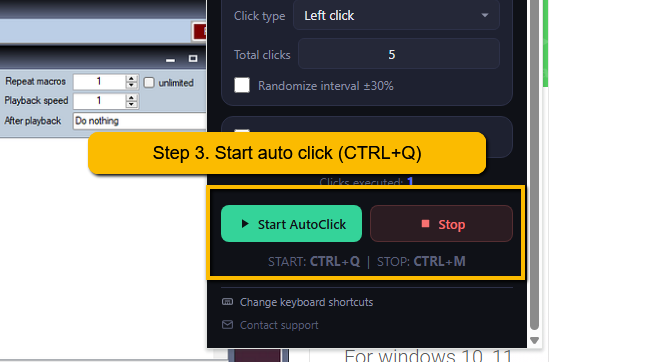
Start with Ctrl+Q and stop with Ctrl+M — no need to open the popup. Fully customizable.
A floating overlay on the page shows real-time click count, total progress, and status — even when the popup is closed.
Choose between left click, double click, and right click. Each type dispatches the full browser event chain for maximum compatibility.
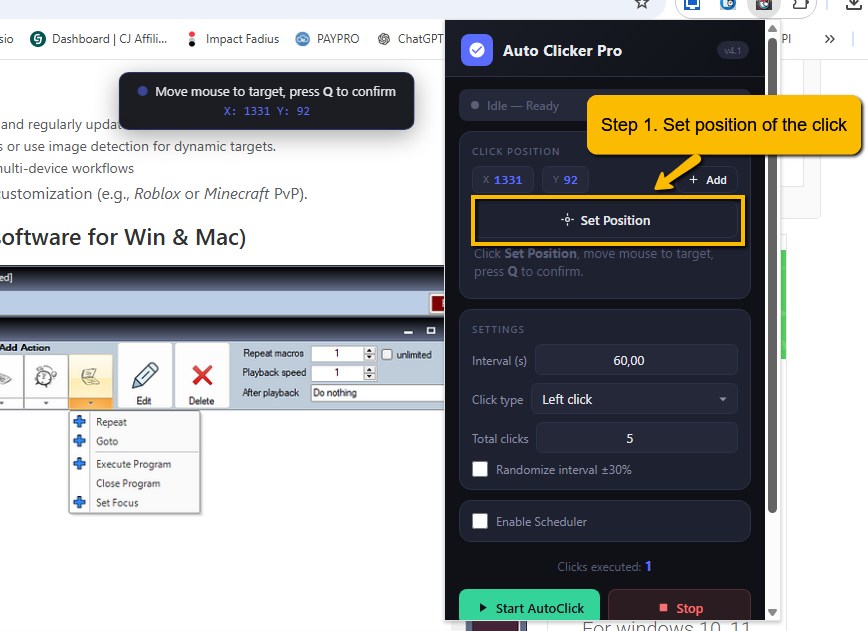
See X/Y coordinates update in real-time as you move your mouse during position selection. Precise to the pixel.
No data collection. No analytics. No server calls. Everything runs 100% locally in your browser. Your clicks, your business.
Get started in seconds
Open the popup, click Set Position, move your mouse to the target area on the page, and press Q to confirm. Live coordinates are displayed as you move.
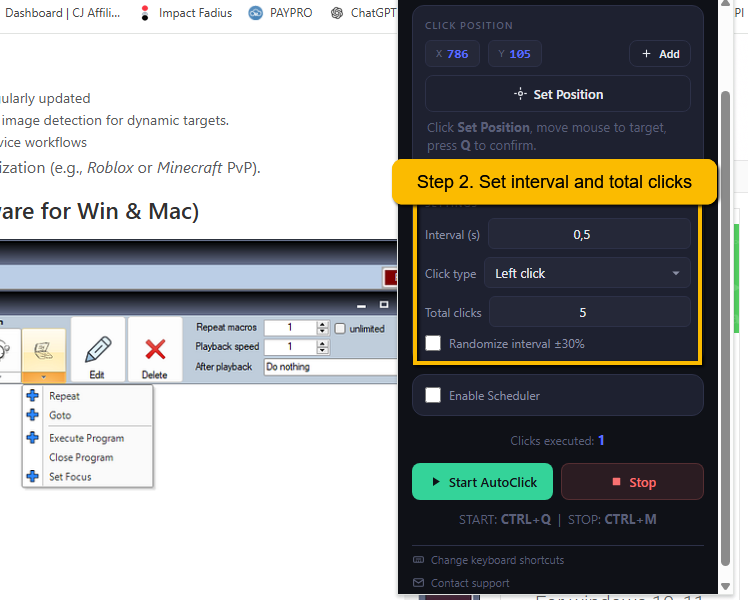
Set the interval, click type, total clicks, and optionally enable randomized timing. Press Start — the popup closes automatically and clicking begins.
A live overlay in the bottom-right shows real-time progress. Press Ctrl+M to stop anytime — a "Stopped" notification confirms it.
See it in action
Watch a complete walkthrough of Auto Clicker Pro — from installation to automating clicks on HTML5 games.
Plans
| Feature | Free | Pro |
|---|---|---|
| Click interval | Min 0.5s | Down to 0.01s |
| Total clicks | Max 100 | Unlimited |
| Multi-point positions | Max 3 | Unlimited |
| Randomized intervals | ||
| Scheduler | ||
| Keyboard shortcuts | ||
| HTML5 game support |
Common questions
Free to install. No account needed. Works on every website. Download from the Chrome Web Store and start clicking in seconds.
Compatible with Chrome, Edge, Brave, Opera, and all Chromium-based browsers.